
Actions
When this happens, do that
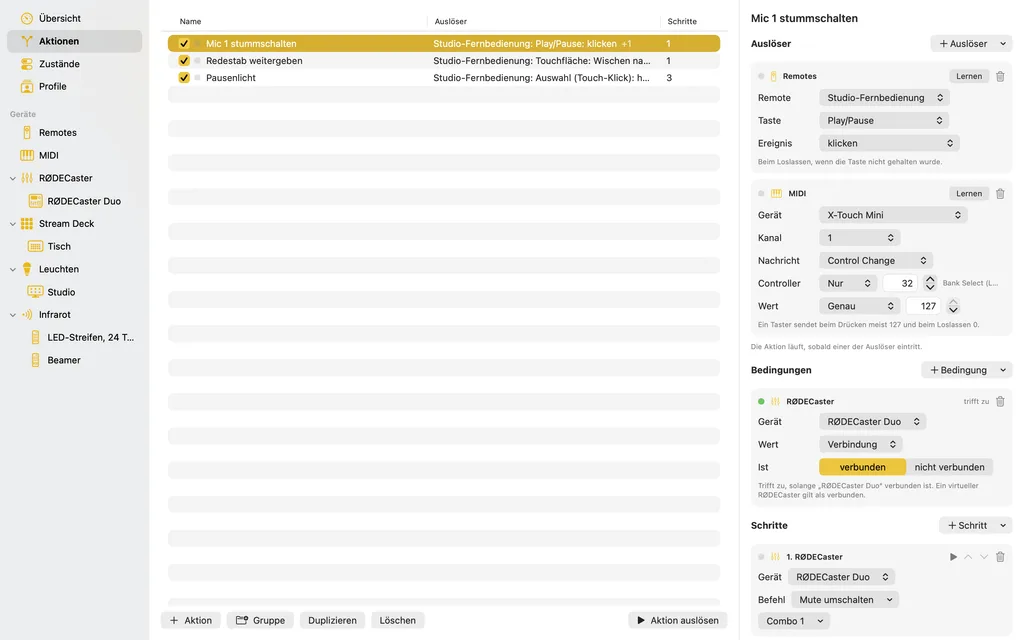
An action connects triggers with steps: when this happens, run these steps. Conditions in between say when not. An action has as many triggers as you like, so the same steps hang on a remote's button, a pad and a Stream Deck key at once.
Triggers
- buttons and gestures of a remote: click, hold, release after holding, tap and swipe on the touch surface
- keys of a Stream Deck, pressed, released or when they change their state
- received MIDI messages
- keys of an infrared remote: press, hold, release
- mute and listen on the RØDECaster, whether someone presses the button on the desk or a step does
- a state group changing
„Lernen“ (learn) saves you the choosing: click it, then press the button, make the gesture or send the message.
Steps
The steps of an action run in order, top to bottom.
| Step | what it does |
|---|---|
| MIDI | send a message to a MIDI device, from a note to SysEx |
| RØDECaster | mute, listen, levels in dB, the outputs' volume |
| Stream Deck | set a key to a state or step it on, the brightness |
| Lights | a blink(1) or a light board: glow, blink, pulse, colour sequence |
| Infrared | send a key to a projector, TV, AV receiver or LED strip |
| Remotes | make a Switch Pro Controller rumble or set its LEDs, a SpaceMouse's LED |
| States | set a state group, step it on or back |
| Actions | run another action's steps along |
| Wait | a pause |
| Shortcuts | run a shortcut from the Shortcuts app |
When a step cannot work, say because a device is missing, only that step does nothing, and the action goes on. The editor and the warning sign show what is missing beforehand.
Conditions
A trigger says what just happened, a condition what is the case right now: a state, mute or listen on the RØDECaster, a button held on a remote or a Stream Deck, a device being there. That way a held button becomes a modifier key, and the same button does two things depending on the situation. All conditions must hold, or one.
Order
Actions stay in the order you give them, in groups as deep as needed, like folders in the Finder. Dragging moves, with ⌥ it copies; a row's switch turns an action or a whole group off without deleting anything. Everything you change in the main window can be undone (⌘Z).