RØDECaster
Remote control for the RØDECaster
Stagehand controls the RØDECaster Pro II and the RØDECaster Duo over USB: mute, listen, levels and volumes as steps, changes on the desk as triggers, and a mixer window that shows the device as it stands.
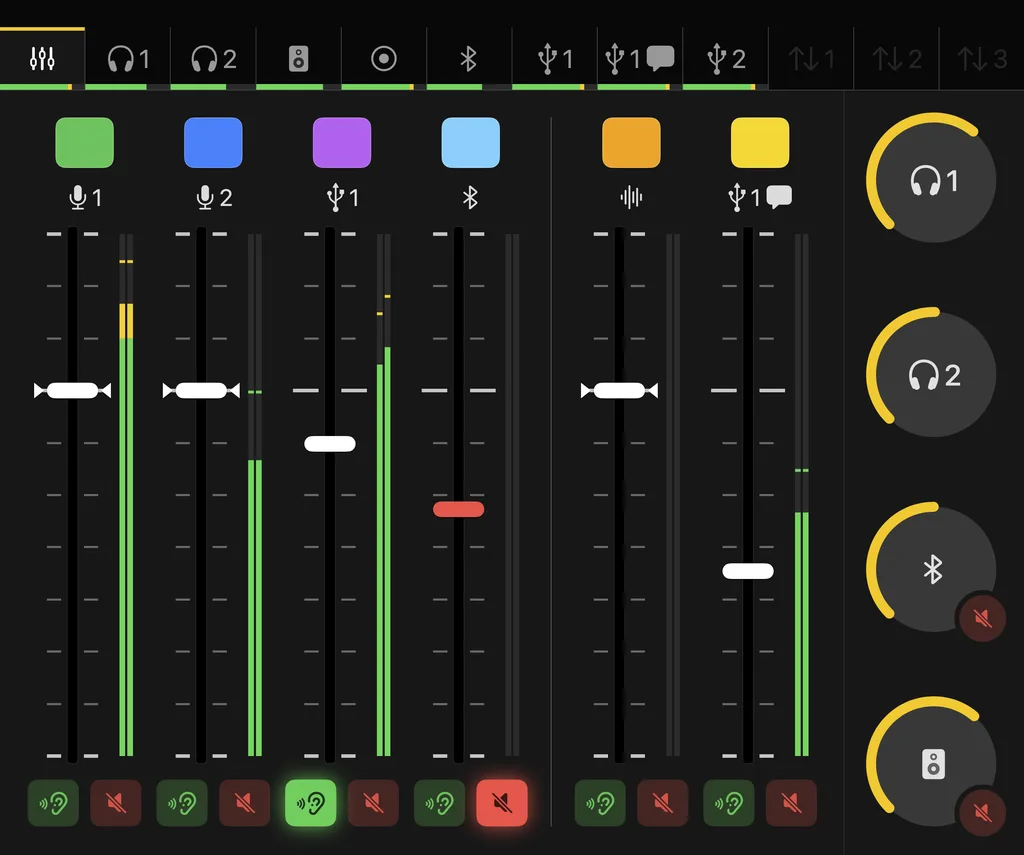
The mixer
A window per device with the faders, the mixes of all outputs (Main Mix, Mix minus, Custom), the volume knobs and the level meters. Virtual faders can be dragged, and every change on the device shows at once. Rest the pointer on an element, and a hint says how it is set right now and what that does. The mixer can be worked entirely with the keyboard and with VoiceOver.
Commands
Mute for a channel, the monitor or Bluetooth, listen, a level in the main mix or in an output's mix, set or changed in dB, the volume of monitor, headphones and Bluetooth. A step names the input, not the fader: if the microphone lies on another fader tomorrow, the step follows it.
Virtual volume controls
The Pro II's headphones have analogue knobs that cannot be remote-controlled. A virtual volume control gives them a volume and a mute anyway, in the mixer and for actions: Stagehand leads the output's mix for it.
Also
The fader assignment on the device's page, several devices told apart by their serial number, a backup of the whole state from which the routing can be restored, and virtual RØDECasters that simulate their state, mixer included.